Relief is closer than you think.
Relax Anywhere. Recharge Anytime.
Locate your nearest Rest N Go station and recharge now.
Download and Enjoy Your RNG Apps Credit Now!


Frequently Asked Questions (FAQ)
Find answers to common questions about our massage chairs, payment methods, mobile app and services.
1. General Questions
Q1. What is Rest N Go?
Rest N Go is a self-service robotic massage chair operator offering convenient and accessible relaxation experiences at shopping malls, airports, transportation hubs and other selected locations.
Q2. How do I use Rest N Go?
Select an available massage chair, choose your preferred package, complete payment and follow the instructions to begin your massage session.
Q3. Do I need to make a reservation?
No reservation is required. Our massage chairs are available on a first-come, first-served basis.
Q4. Do I need the Rest N Go App to use the massage chairs?
Not necessarily. Selected stations accept alternative payment methods, including DuitNow QR and cash. However, we recommend downloading the Rest N Go App for convenient payments, easy station locating, and access to app-exclusive promotions, special rewards and bonus credits for greater value with every massage.
Q5. What are the benefits of using Rest N Go?
Rest N Go offers affordable, convenient and hassle-free massage experiences without appointments. Whether you’re shopping, travelling or taking a break, enjoy a quick recharge to ease tension, relax and feel refreshed before continuing your day.
2. Using Our Massage Chairs
Q6. How do I start a massage session?
Select an available chair, check the massage packages, sit comfortably and follow the payment and activation instructions displayed.
Q7. How much does a massage session cost?
Prices vary by location, chair model and massage duration. Please refer to the displayed pricing before making payment.
Q8. How long is a massage session?
Massage durations vary according to the available packages and chair models. Please check the options displayed before payment.
Q9. Can I adjust the massage settings?
Selected chair models offer adjustable massage settings. Please refer to the chair’s control panel for available functions.
Q10. Can I extend my massage session?
Session extensions are available on selected chair models. Where supported, follow the displayed instructions to purchase additional massage time.
Q11. Can I stop my massage before the session ends?
Yes. You may use the designated Stop or Pause function, where available. Refunds for unused time are subject to our Refund Policy and applicable law.
Q12. Why does the massage chair make an announcement when I sit down?
Selected models feature automated voice reminders to encourage session activation and help manage chair availability.
Q13. Can I sit on a massage chair without making payment?
Our massage chairs are reserved for customers using the paid service. We kindly request that chairs are not occupied without an active massage session.
3. Payments and Pricing
Q14. What payment methods are accepted?
Depending on the station, available payment methods may include the Rest N Go App, DuitNow QR, supported e-wallets, cash and contactless bank cards.
Q15. Can I pay using Touch ‘n Go eWallet?
Yes, at selected stations that support compatible DuitNow QR or e-wallet payments.
Q16. Can I combine cash and e-wallet payments for one session?
No. Each massage session must be paid for using a single supported payment method.
Q17. What happens if I pay less than the required amount?
The massage session may not activate. Please contact Customer Service if payment has been deducted but the session did not start.
Q18. Do massage chairs provide change for cash payments?
No. Our massage chairs do not provide change. Please insert the exact amount required. For incorrect payments, contact Customer Service for assistance.
Q19. How can I confirm whether my payment was successful?
You may verify your payment status through your payment provider, the Rest N Go App or the massage chair’s activation status.
If payment has been deducted but the massage session does not start, please avoid making additional payments. Kindly check your transaction status and contact our Customer Service team for further assistance.
4. Rest N Go App & Account
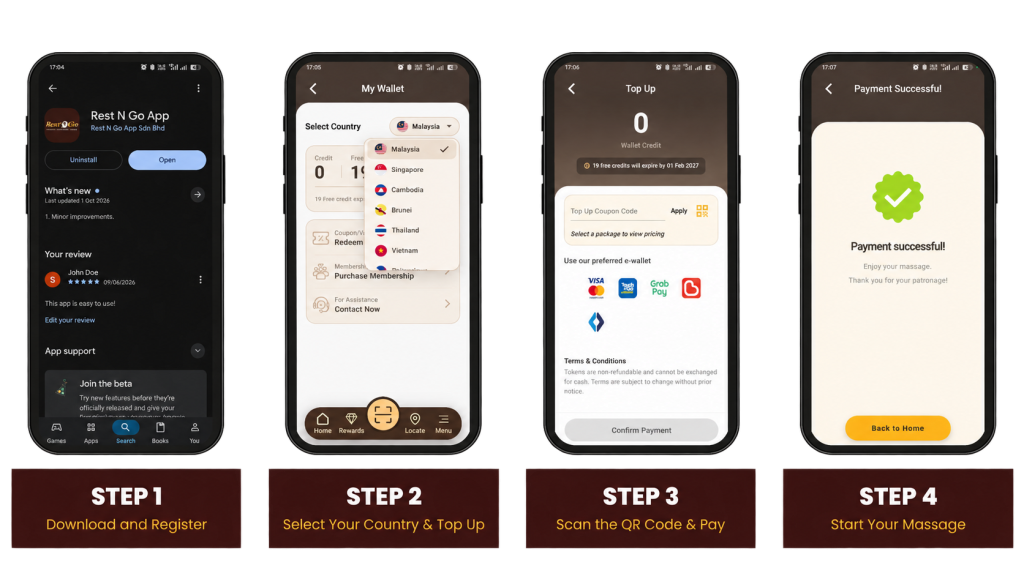
Q20. Where can I download the Rest N Go App?
Download the official Rest N Go App from the Apple App Store or Google Play Store.
Q21. How do I register for a Rest N Go account?
Download the app, register using your email address or phone number, and complete the verification process.
Q22. Can I use the Rest N Go App without registering?
The Rest N Go App allows guests to access selected features without registration. However, creating an account is required to enjoy additional features, including wallet management and transaction history.
Q23. What should I do if I do not receive my verification code?
Check your registered contact details, spam email and network connection. Request a new code if necessary, or contact Customer Service.
Q24. What should I do if I cannot log in?
Check your login credentials, internet connection and app version. If the issue persists, please contact Customer Service.
Q25. Can I view my previous massage transactions?
Yes. Eligible transactions linked to your registered account can be viewed through the Rest N Go App.
Q26. Can I use my Rest N Go account in different countries?
The app supports services across multiple countries. However, payment methods, wallet balances and promotions may vary by country.
5. Wallet, Credits & Promotions
Q27. How do I top up my Rest N Go App wallet?
Log in to the app, select the wallet top-up option, choose your preferred amount and complete payment.
Q28. Do Rest N Go App credits expire?
Standard purchased credits currently have no expiry date. Promotional credits and rewards may be subject to separate validity periods.
Q29. Can I withdraw or transfer my wallet credits?
Wallet credits are generally non-withdrawable and non-transferable. For balance discrepancies, please contact Customer Service.
Q30. Can I use my Malaysia wallet credits overseas?
No. Wallet balances are maintained separately by country and cannot automatically be used or transferred across different country wallets.
Q31. Why is my wallet balance not updated after a top-up?
Payment updates may occasionally be delayed. Please refresh the app and check your transaction history. If the issue persists, contact Customer Service with your payment details.
Q32. How do I redeem a promotional code?
Enter your valid promotional code in the designated field during the applicable top-up or transaction process.
Q33. Why is my promotional code not working?
The code may be expired, incorrectly entered, previously redeemed or subject to eligibility restrictions. Please check the promotional terms.
Q34. Does Rest N Go offer promotions and rewards?
Yes. We offer selected promotions, rewards and complimentary credits from time to time. Visit our app or official social media channels for updates.
6. Troubleshooting & Technical Issues
Q35. What should I do if I have paid but the massage chair does not start?
We apologise for the inconvenience. Please avoid making additional payments and contact Customer Service with your chair details and payment information.
Q36. What should I do if the massage chair stops unexpectedly?
Please check for any displayed error messages and contact Customer Service with your chair location and transaction details.
Q37. What should I do if the massage chair makes unusual noises or movements?
Stop the session if it is safe to do so. Please do not attempt to repair the chair and report the issue to Customer Service.
Q38. What should I do if I cannot scan the QR code?
Check your internet connection, camera permissions and QR code positioning. If the issue persists, please restart the app or contact Customer Service.
Q39. What should I do if the massage chair displays an error message?
Please contact Customer Service with the error code, chair location and a photograph of the error message, if available.
Q40. What happens if there is a power interruption during my massage?
Please contact Customer Service with your transaction details. Our team will investigate and assess the appropriate resolution.
7. Refunds & Compensation
Q41. Can I request a refund if the massage chair fails to operate after payment?
Yes. You may submit a refund request for verification. Eligibility will be assessed in accordance with our Refund Policy and applicable law.
Q42. Can I request a refund if my massage session ends prematurely?
Yes. Sessions interrupted by verified technical issues may qualify for a refund or other appropriate resolution, subject to review.
Q43. Can I request a refund if I select the wrong massage package?
Please verify your package before payment. Refunds for incorrect selections are generally not available once the service has been delivered, except where required by law or otherwise approved.
Q44. What should I do if I am charged twice?
Please contact Customer Service with both payment receipts or transaction references. Verified duplicate charges will be reviewed for an appropriate refund or adjustment.
Q45. How do I submit a refund request?
Please contact Customer Service and provide the following information:
- Chair Serial No.
- Location
- Payment Method (receipt or screenshot for online payments)
- Transaction Time
Our team will review your request in accordance with the applicable Refund Policy.
Q46. How long does the refund process take?
Processing times vary depending on transaction verification and payment method. Customer Service will provide further information following the review.
Q47. Can I request a refund for unused Rest N Go App credits?
Purchased wallet credits are generally non-refundable. However, verified payment errors or balance discrepancies may qualify for review, subject to applicable law.
8. Health, Safety & Hygiene
Q48. Are Rest N Go massage chairs safe to use?
Rest N Go maintains equipment safety and quality standards through applicable certification processes, regular servicing and maintenance. Customers should follow the displayed safety instructions.
Q49. Are Rest N Go massage chairs suitable for everyone?
Massage chairs may not be suitable for certain medical conditions. Please consult a healthcare professional before use if you are pregnant, have an injury, medical implant or other relevant health concerns.
Q50. Can children use Rest N Go massage chairs?
Usage depends on the chair model and applicable safety requirements. Children must meet the relevant requirements and should only use suitable chairs under adult supervision.
Q51. How frequently are Rest N Go massage chairs maintained?
Our massage chairs undergo regular maintenance and servicing to support equipment performance, reliability and customer safety.
Q52. Are Rest N Go massage chairs cleaned regularly?
We strive to maintain cleanliness across our stations. Cleaning arrangements vary by location. Please report any hygiene concerns to Customer Service.
Q53. Can I eat or drink while using a massage chair?
For safety and hygiene reasons, eating and drinking are not permitted while using our massage chairs.
9. Locations & Availability
Q54. Where can I find Rest N Go massage chairs?
Rest N Go operates at selected locations across seven Southeast Asian countries: Malaysia, Singapore, Thailand, Vietnam, Brunei, Cambodia and the Philippines. Use our app to locate nearby stations.
Q55. Are Rest N Go massage chairs available 24 hours a day?
Operating hours vary by location. Some stations offer 24-hour access, while others follow the operating hours of their respective premises.
Q56. How do I find the nearest Rest N Go station?
Use the station locator in the Rest N Go App to find nearby locations. Please note that real-time chair availability may not be displayed.
Q57. What should I do if all massage chairs are occupied?
You may wait for an available chair or use the Rest N Go App to locate another nearby station.
10. Customer Support
Q58. How can I contact Rest N Go Customer Service?
Our Customer Service team is available through the following channels:
- WhatsApp: +6012-661 3174
- customer.service@restngoapp.com
- +603-6277 9222
- Rest N Go Contact Page
- Operating Hours: 10:00 AM – 6:00 PM, Saturday to Thursday. Closed on Fridays.
Q59. What information should I provide when reporting an issue?
To assist our investigation, please provide:
- Chair Serial No.
- Location
- Payment Method (receipt or screenshot for online payments)
- Transaction Time
Providing complete information will help us review your case efficiently.
Q60. What should I do if I have not received a response to my complaint?
Please follow up through our official Customer Service channels with your previous enquiry details or case reference. Our team will assist in checking the status.